For the gift of the right story

Your family's library,
always up to date.

One shareable page for every book your family owns, wants, and has loved so the people who care can always give the right thing.

Create your library
The Very Hungry CaterpillarGoodnight MoonWhere the Wild Things AreCharlotte's WebThe Giving TreeMatilda

Why First Chapter Co.

Every gift, every memory,
in one place.

No more guessing. No more duplicates. Just one page your whole family can find and use.

Owned and wishlist

Track every book your family has and every book they are hoping for next.

Duplicate gift prevention

Grandparents, aunts, and friends can check what has already been given before they shop.

Share with one link

A shareable page at getfirstchapterco.com/yourfamily, always current, always easy.

Memories, too

Log the books your child loved, laughed at, or asked to hear one more time.

How it works

Up and running
in minutes.

01

Create your page

Set up a library for your family in under two minutes. No app download needed.

02

Add your books

Search and add books to your owned shelf or wishlist with a single tap.

03

Share the link

Send your page to family before every birthday, holiday, or just because.
A sneak peek

See it in action

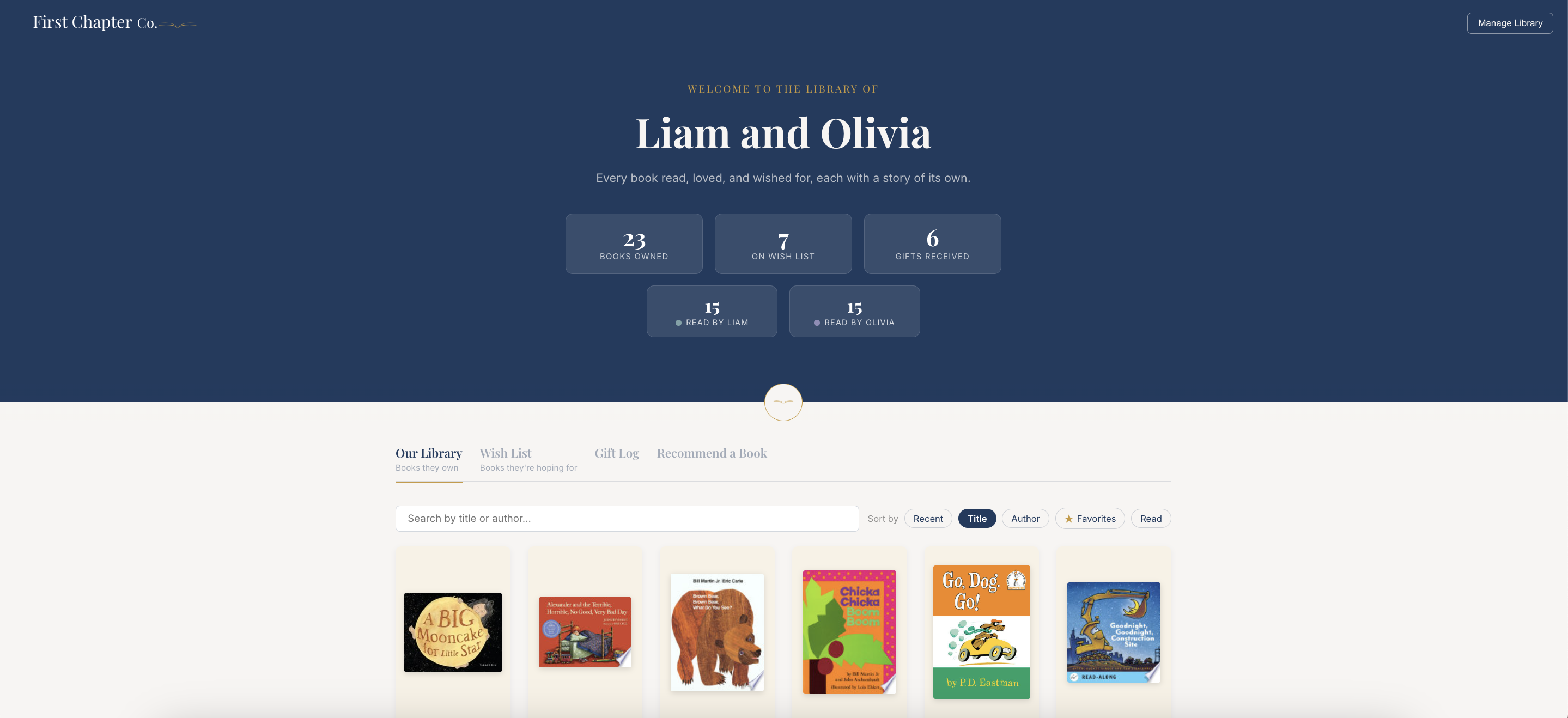
Here is what your family library could look like inside First Chapter Co.

Your whole library in one beautiful page -- books owned, wish list, and gifts received.

Your whole library in one beautiful page -- books owned, wish list, and gifts received.

FAQ

Questions? We have answers.

Getting started

Fill out the form at the bottom of this page with your name and email. We will send you a magic link straight to your inbox -- click it and your library is live. No password, no app download required.

Once your library is set up you will have a unique link like getfirstchapterco.com/your-family. Copy it and send it to anyone you want -- grandparents, aunts, uncles, friends. They can view your library instantly without creating an account.

Yes. You can invite other family members as admins from your library settings. Admins can add books, log gifts, and manage the wishlist just like you can. Please keep in mind admins can edit your account in full.

Books

In Admin mode, from your library or wish list, click the gold "Add a book" button and search by title, author, or ISBN. Select the book from the results and choose whether it goes in your library or wish list. It takes about ten seconds.

No cover image? No problem. We show a clean placeholder so your library still looks great. You can still add all the book details and it will appear normally in your list. You have the option to add a cover url in edit mode. Check out our knowledge base for a step by step.

Yes. While in Admin mode, click any book in your library to open its detail page, then use the edit option to update the shelf it is on, add notes, or remove it entirely.

Age filters only apply to books that have an age range set. To tag a book, click the edit icon on any book card and select an age range from the dropdown. Books without a tag will always appear when "All" is selected.

Gifts

The gift log is a record of every book your child has been given -- who gave it, for what occasion, and any notes from the giver. When someone logs a gift it goes into a pending queue for you to approve before it shows on the library.

Share your library link before any birthday or holiday. Gift givers can see exactly what is on the wish list and what is already owned -- so nothing gets duplicated. If a book is already in the library we flag it with a heads-up warning.

Yes. Anyone with your library link can use the "Recommend a Book" tab to suggest a title. It lands in your queue for you to approve or dismiss -- you stay in control of what goes on your wish list and in your library.

Account

Your library is accessible to anyone who has the link, but it is not indexed or searchable. Only people you share the URL with can find it -- think of it like a private Google Doc with a shareable link.

Just enter your email on the sign-in page and we will send you a fresh magic link. No password to remember -- ever.

Pilot families get early-access pricing. We will share full pricing details before your trial ends -- you will not be charged anything during signup today.

Still have questions? Drop us a note.

First Chapter Co.

Skip the spreadsheet.

One page. Every book. No duplicates.

Get started

Get started

Create your family library.

Set up your page in under two minutes. We will send your shareable link straight to your inbox.

Owned + wishlist tracking
Shareable family link
Duplicate gift prevention
Memory log
Annual billing, cancel anytime
Early access pricing
getfirstchapterco.com/

No spam, ever. We will only reach out when your spot is ready.